
Wrote this one for a friend that does a coding boot camp and thought it may be a good idea to share it also here.
So, the scope is to display some Javascript values in an HTML table.
Let’s say we have these 2 Javascript variables:
const name = "Jhon Doe"
const salary = 1234
And the below HTML table:
<table>
    <tr>
        <th>Name</th>
        <th>Salary</th>
    </tr>
    <tr>
        <td id="cellN"></td>
        <td id="cellS"></td>
    </tr>
</table>
To input these 2 variables in a table we can use a mix of querySelector() and the innerHTML property:
document.querySelector("#cellN").innerHTML = name;
document.querySelector("#cellS").innerHTML = salary;
And that’s it. You will get a table like the one below:
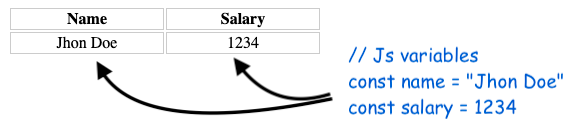
Below is the full code, or you can check out this codepen for the live example.
<body>
 <table>
    <tr>
        <th>Name</th>
        <th>Salary</th>
    </tr>
    <tr>
        <td id="cellN"></td>
        <td id="cellS"></td>
    </tr>
</table>

  <script type="text/javascript">
    const name = "Jhon Doe"
    const salary = 1234

    document.querySelector("#cellN").innerHTML = name;
    document.querySelector("#cellS").innerHTML = salary;
  </script>

</body>
Input multiple Javascript variables in an HTML table
Complementary to this if we would want multiple Javascript variables to be placed in new rows on an HTML table we could have used the cloneNode() method to create a new row for each added element.
Let’s say we want to build the output from this picture:

We can achieve this with the below code:
<body>

 <table>
    <tr>
        <th>Name</th>
    </tr>
    <tr class="row">
        <td></td>
    </tr>
</table>

  <script type="text/javascript">
    const employees = ["foo", "bar", "baz"]

    const tableElement = document.querySelector("table");
    const rowTemplate = document.querySelector(".row");

    employees.forEach( e => {
      const newRow = rowTemplate.cloneNode(true)
      newRow.querySelector("td").innerHTML = e
      tableElement.appendChild(newRow)
    })

  </script>

</body>
And here is the codepen for this example.
📖 Neural Networks from Scratch - Presale
I'm writing a book about the timeless foundational concepts of neural networks for JavaScript developers. Go from if-else to weights and biases by building tiny AI models from scratch!
📖 Neural Networks from Scratch - Presale
I'm writing a book about the timeless foundational concepts of neural networks for JavaScript developers. Go from if-else to weights and biases by building tiny AI models from scratch!