
If you want to persist and manipulate a value in React between component renders without triggering a new rerendering you may want to take a look at the useRef() hook.
Even dought useRef() is mainly used to store a reference to DOM elements it can be also used to store and update values without extra renderings:
const ref = useRef(0)

<button onClick={()=> ref.current+= 1 } >
        Update ref value
</button>
Let’s take the below example that showcases the differences between using useRef() and useState() for storing variables:
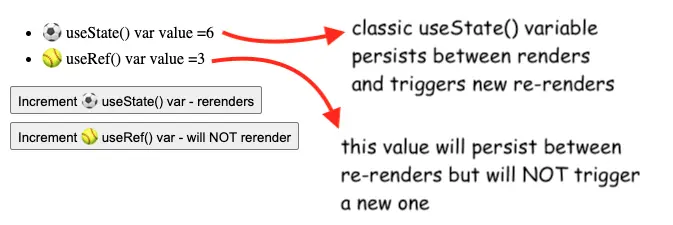
The code for this example is pretty straightforward:
const [stateVar, setStateVar] = useState(0)
const refVar = useRef(0)

const incState = () => setStateVar(val => val + 1)
const incRef = () => refVar.current += 1
return (<div>
    <ul>
        <li>⚽️ useState() var value ={stateVar} </li>
        <li>🥎 useRef() var value ={refVar.current} </li>
    </ul>
    <button onClick={incState} >
        Increment ⚽️ useState() var - rerenders
    </button>
    <button onClick={incRef}>
        Increment 🥎 useRef() var - will NOT rerender
    </button>
</div>)
If you change the stateVar, the component will re-render, while with the refVar we will keep the value between renders without triggering a new one.
Note that in order to change the refVar value, you will need to change ref.current (and not the refVar itself!)
Also, the 🥎 useRef() var value will not show its real value until a new rerender is triggered by a useState() call.
The full code for the example is here, and the live example is on Github pages.
By the way, if you can also use the useRef() hook to count the real number of renders in a React component.
📖 Neural Networks from Scratch - Presale
I'm writing a book about the timeless foundational concepts of neural networks for JavaScript developers. Go from if-else to weights and biases by building tiny AI models from scratch!
📖 Neural Networks from Scratch - Presale
I'm writing a book about the timeless foundational concepts of neural networks for JavaScript developers. Go from if-else to weights and biases by building tiny AI models from scratch!