
The setState() hook in React is asynchronous. This can lead us to some undesired results as we will see in the folowing example.
The problem
A friend asked me to help him with the following code:
// ✋🛑 there is a bug here
const App = () => {
    const [query, setQuery] = useState('')
    const [jokes, setJokes] = useState([])

    const search = (e) => {
        setQuery(e.target.value)
        fetch('https://icanhazdadjoke.com/search?term=' + query, {
            headers: { Accept: 'application/json' }
        })
        .then(resp => resp.json())
        .then(json => {
            console.log(json)
            setJokes(json.results)
        })
    }

    return (<div>
        <input value={query} onChange={search} />
        <p>Found {jokes.length} jokes about "<b>{query}</b>"!</p>
    </div>);
}
The idea was simple. Search in an API what the user typed in the text input.
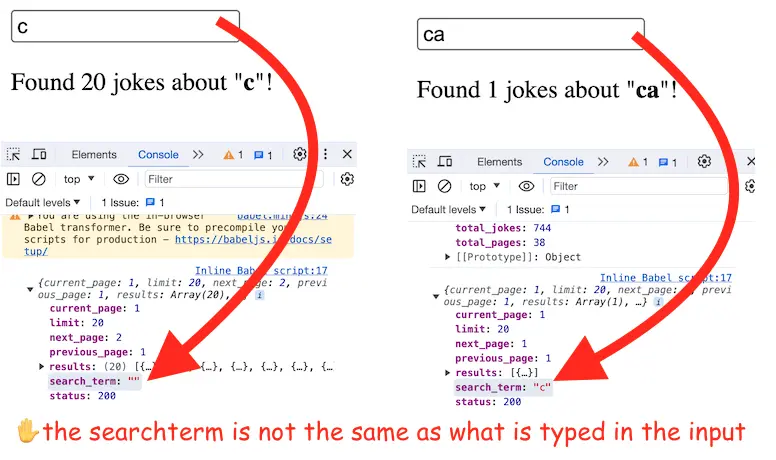
However, the searchterm was always one character behind what was typed in the input.
The solution
This happens because React setState() is asynchronous.
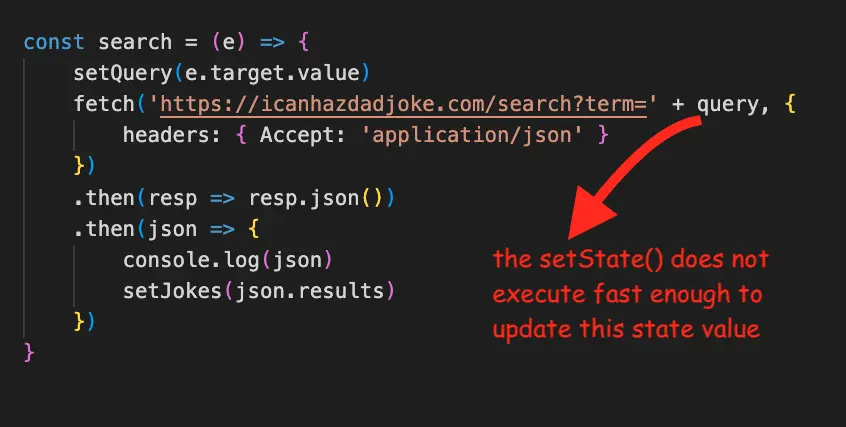
One reason why setState() is async is to batch mutiple setState() calls for performance gains.
In this case, it would make sense to be able to write something like this:
setState().then( /* do the fetch here */)But setState() does not have support for a then function.
So, while the above solution is not an option, what we can do is to monitor the query value with the useEffect() hook.
When the state value changes we will fetch new data:
// 👍 Do this instead
const App = () => {
    const [query, setQuery] = useState('')
    const [jokes, setJokes] = useState([])

    useEffect(() => {
        fetch('https://icanhazdadjoke.com/search?term=' + query, {
            headers: { Accept: 'application/json' }
        })
        .then(resp => resp.json())
        .then(json => {
            console.log(json)
            setJokes(json.results)
        })
    }, [query])

    const search = (e) => setQuery(e.target.value)

    return (<div>
        <input value={query} onChange={search} />
        <p>Found {jokes.length} jokes about "<b>{query}</b>"!</p>
    </div>);
}
This will make sure that our code runs in perfect sync with the state variables and will avoid the bug.
You can check out the full code example on my GitHub and the running example here.
📖 Neural Networks from Scratch - Presale
I'm writing a book about the timeless foundational concepts of neural networks for JavaScript developers. Go from if-else to weights and biases by building tiny AI models from scratch!
📖 Neural Networks from Scratch - Presale
I'm writing a book about the timeless foundational concepts of neural networks for JavaScript developers. Go from if-else to weights and biases by building tiny AI models from scratch!