
Are you looking to target the first and last elements that share a certain CSS class?
For example, we want to style only the first and last elements with the .circle class:
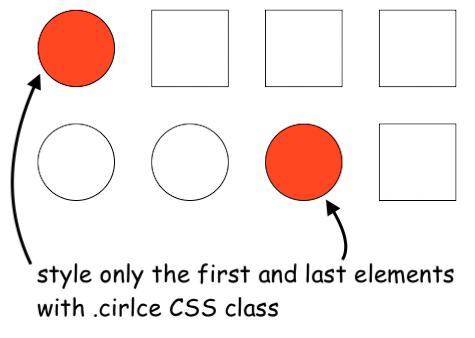
Well, there are two ways to accomplish this task.
Using the :nth-child() to select the first and last element with a class
We can use the :nth-child() and :nth-last-child() to select the first and last elements that have the .circle class.
In my opinion these two pseudo-classes are the most straightforward solution:
/* target first element with class ".circle" */
:nth-child(1 of .circle) {
    background-color: orangered;
}

/* target last element with class ".circle" */
:nth-last-child(1 of .circle) {
    background-color: orangered;
}
Mixing the :not, has, and adjacent sibling CSS selectors to get the first and last elements with a class
Another solution can be this one:
/* target first element with class ".circle" */
.circle:not(.circle ~ *) {
    background-color: blue;
}

/* target last element with class ".circle" */
.circle:not(:has(~ .circle)) {
    background-color: blue;
}
To select the last element we target all elements with the .circle class that do not contain a direct descendant with the same .circle class.
While the selection of the first element is a bit more complicated. We target all elements with the .circle class that do not have any sibling elements that come after them and are of any type.
You can checkout the full code of the example and see it live on GitHub pages.
📖 Neural Networks from Scratch - Presale
I'm writing a book about the timeless foundational concepts of neural networks for JavaScript developers. Go from if-else to weights and biases by building tiny AI models from scratch!
📖 Neural Networks from Scratch - Presale
I'm writing a book about the timeless foundational concepts of neural networks for JavaScript developers. Go from if-else to weights and biases by building tiny AI models from scratch!