
Let’s see how we can use React to fetch an image at a given URL and convert that image to blob data.
To demonstrate this, we will build this small application:
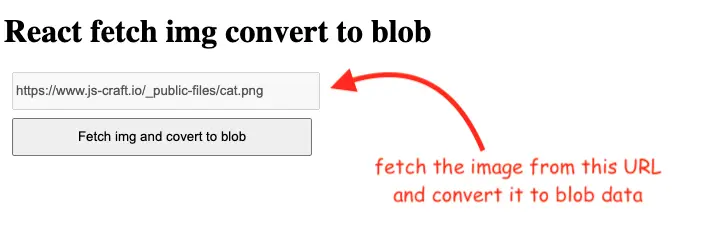
Below is the code that will use the fetch() API to retrieve the image, and will return the blob representation of the image.
const DEFAULT_URL = "https://www.js-craft.io/_public-files/cat.png"
const App = () => {
    const [url, setUrl] = React.useState(DEFAULT_URL)

    const fetchAndCovertToBlob = ()=> {
        fetch(url)
            .then( response => response.blob())
            .then( blobData => {
                const {size, type} = blobData
                alert(` 🌅 IMG Type: ${type} \n 🌌 IMG Size: ${size}`)
            });
    }

    return (<div>
        <input type="text" value={url} onChange={e => setUrl(e.target.value)}  />
        <button onClick={fetchAndCovertToBlob}>Fetch img and covert to blob</button>
    </div>)
}
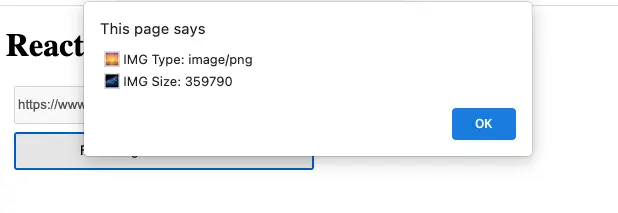
When we will press the button we will get some overall information about that image from the blob data:
If you want to actually store and use the blob data you can set it on a state variable:
const [blobData, setBlobData] = React.useState(null)
// ...
fetch(url)
            .then( response => {
                const data = response.blob()
                setBlobData(data)
                return data
        })
        // continue
Note that depending on your setup you may need to also take care of the CORS policy or you will get the below error:
Acess to fetch at <<url_here>> from origin 'null' has been blocked by CORS policy: No 'Access-Control-Allow-Origin' header is present on the requested resource. If an opaque response serves your needs, set the request's mode to 'no-cors' to fetch the resource with CORS disabled.For this example, I’ve set the following code on my images folder server .htaccess file:
<IfModule mod_headers.c>
    Header set Access-Control-Allow-Origin "*"
</IfModule>
As usual, you can see the full code in its Github repo and play with the live example here.
Also, you can see in this article how to use the generated blob data to facilitate copying and pasting images to the clipboard.
📖 Neural Networks from Scratch - Presale
I'm writing a book about the timeless foundational concepts of neural networks for JavaScript developers. Go from if-else to weights and biases by building tiny AI models from scratch!
📖 Neural Networks from Scratch - Presale
I'm writing a book about the timeless foundational concepts of neural networks for JavaScript developers. Go from if-else to weights and biases by building tiny AI models from scratch!