
The default type of JPEG is called a Baseline JPEG. Hover, alongside the Baseline JPEGs we also have the Progressive JPEGs. The main difference between them is the way they are loaded in the browser.
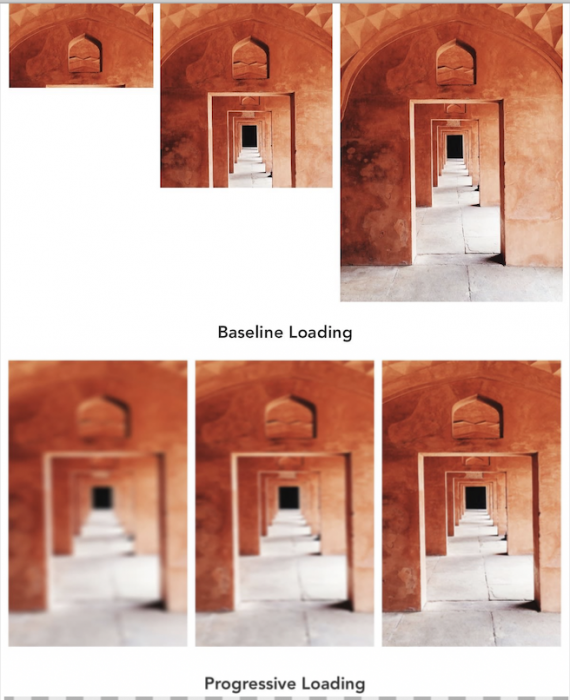
Original img was taken form here.
The Baseline JPEGs are loaded one line at a time. Remember those dial-up days we waited for a big picture to load, while it was rendered one line at a time while the bottom part of the picture was empty 😀 ?
On the other side, the new Progressive JPEGs are meant to be loaded in layers. Initially, we see just one low detail preview, after we get a better one, and so on.
Neitherles to say it’s an improvement for the user experience. It’s a bit like using low-resolution previews placeholder for big images without the hacking.
How can I convert from a Baseline JPEG to a Progressive JPEG
Yeah, we can. There are online tools like this one. Or, we can use a local tool like jpegtran:
$jpegtran -progressive old.jpeg > new.jpegIn general, the Progressive JPEG version should not bigger than its Baseline counterpart.
Are Progressive JPEGs supported in all major browsers
Yeah, the future is now. We can use Progressive JPEGs almost everywhere. It seems that for Safari the progressive image will be rendered all at once.
📖 Neural Networks from Scratch - Presale
I'm writing a book about the timeless foundational concepts of neural networks for JavaScript developers. Go from if-else to weights and biases by building tiny AI models from scratch!
📖 Neural Networks from Scratch - Presale
I'm writing a book about the timeless foundational concepts of neural networks for JavaScript developers. Go from if-else to weights and biases by building tiny AI models from scratch!