
The output parsers from Langchain.js are meant to convert the AI responses into complex structures, like CSV, JSON, Arrays, and more.
Note that even if newer models such as ChatGpt 4 can do part of this data manipulation out of the box, they are more expensive to use so we can leverage output parsers to save some costs.
For all of the below examples we will assume that we have the following LangChain model of type ChatOpenAI defined:
const model = new ChatOpenAI({
  modelName: "gpt-3.5-turbo"
});
The StringOutputParser in Langchain.js
Maybe the easiest-to-use parser, the StringOutputParser takes the model output and converts it into a simple string.
Let’s take the following code:
const tmpl = "Tell me a joke about {topic}."
const prompt = ChatPromptTemplate.fromTemplate(tmpl)
const chain = prompt.pipe(model)
const response = await chain.invoke({ topic: "cat" })
It will output a complex AIMessage Javascript object like this one:
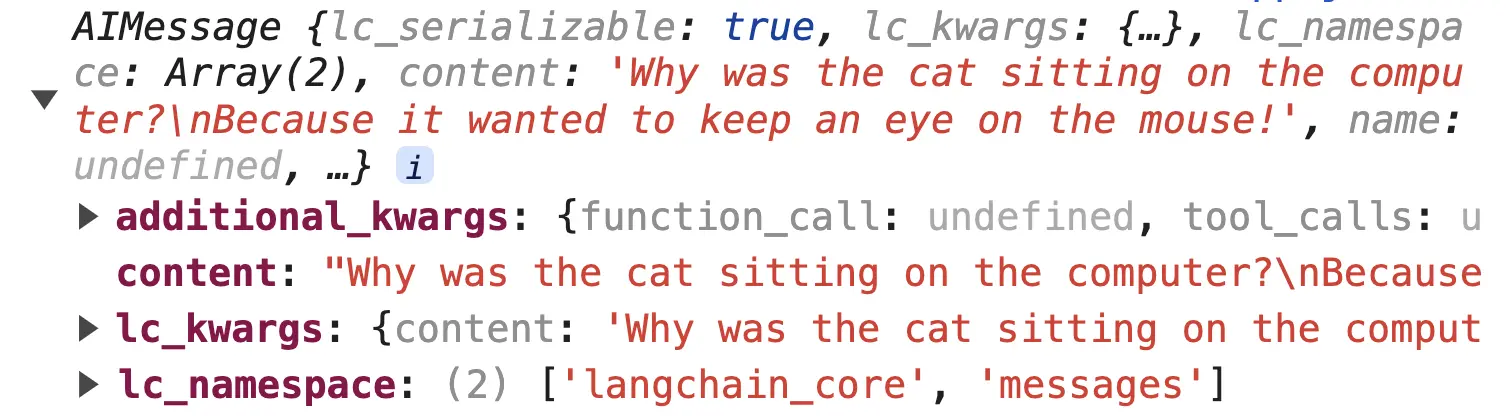
Let’s now add a StringOutputParser() to the chain:
import { StringOutputParser} from "@langchain/core/output_parsers"
// ...
const tmpl = "Tell me a joke about {topic}."
const prompt = ChatPromptTemplate.fromTemplate(tmpl)
const stringParser = new StringOutputParser()
const chain = prompt.pipe(model).pipe(stringParser)
const response = await chain.invoke({ topic: "cat" })
We will now get just a plain simple string response:
'Why was the cat sitting on the computer? Because it wanted to keep an eye on the mouse!'The CommaSeparatedListOutputParser and CustomListOutputParser in Langchain.js
The CommaSeparatedListOutputParser parser serves two porpuses:
- translates from a complex
AIMessageobject into a simple response - format the response as an array
Let’s take this code:
const tmpl = "Give 3 synonyms for {topic}, seperated by commas."
const prompt = ChatPromptTemplate.fromTemplate(tmpl)
const chain = prompt.pipe(model)
const response = await chain.invoke({ topic: "cat" })
This is how a response will look like without the parser:
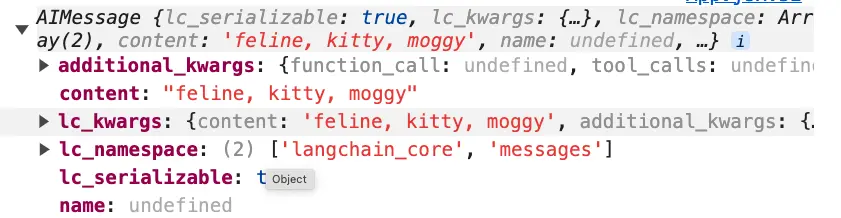
And if we add the CommaSeparatedListOutputParser
import { CommaSeparatedListOutputParser} from "@langchain/core/output_parsers"
// ...
const tmpl = "Give 3 synonyms for {topic}, seperated by commas."
const prompt = ChatPromptTemplate.fromTemplate(tmpl)
const listParser = new CommaSeparatedListOutputParser()
const chain = prompt.pipe(model).pipe(listParser)
const response = await chain.invoke({ topic: "cat" })
We will get a standard Javascript array:
['feline', 'kitty', 'pussycat']By the way, we have used the CommaSeparatedListOutputParser in the example app with LangChain and ReactJs.
As a complementary tool for the CommaSeparatedListOutputParser there is the CustomListOutputParser that can respond based on any character we give it:
import { CustomListOutputParser} from "@langchain/core/output_parsers"
// ...

const customListParser = new CustomListOutputParser({ separator: "\n" })
const chain = prompt.pipe(model).pipe(customListParser)
We can also provide a fixed length attribute to the custom list parser: CustomListOutputParser:
new CustomListOutputParser({ length: 3, separator: "\n" })And ff the length from the parser is not the same as what the model returned then Langchain will throw the following error:
Uncaught (in promise) Error: Incorrect number of items. Expected X, got Y📖 Neural Networks from Scratch - Presale
I'm writing a book about the timeless foundational concepts of neural networks for JavaScript developers. Go from if-else to weights and biases by building tiny AI models from scratch!
📖 Neural Networks from Scratch - Presale
I'm writing a book about the timeless foundational concepts of neural networks for JavaScript developers. Go from if-else to weights and biases by building tiny AI models from scratch!