
In the constant attempts to improve my chronic back pain, I’ve started to use a walking treadmill for my home office. Below is a picture of my current home office setup.
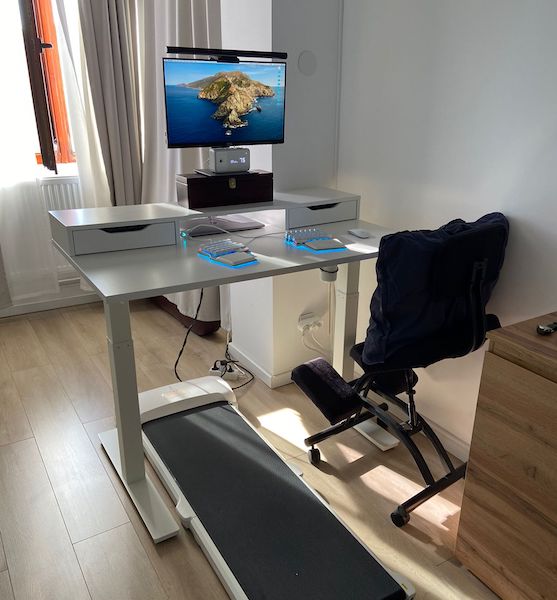
I was inspired to try this setup by Michael Sloan’s blog. Thanks a lot for the inspiration, Mike 🙌!
The overall idea is that the best ergonomic position for your back is a constant change of positions. Our bodies are not meant to stay in a fixed position for hours and hours.
I’ve decided to go with the Xiaomi WalkingPad C1 model, which cost about $300. But there are also other alternatives. One interesting alternative I was considering was the Egofit Walker Pro Treadmill Base for its inclined walking feature and reduced size.
I use it for about 2-3 hours per day. Usually, I get a 30-minute walking session. After that, I switch to using a kneeling chair or just standing at my desk without walking. From a walking speed perspective, I use it at about 1.5 to a maximum of 2 km per hour. Anything above that makes it harder to type or focus on the screen.
So, how is it? Well, it’s great! My back is a bit better, but the biggest unexpected advantage is the extra energy it gives me. Walking, even at a low speed, is as effective as getting a cup of coffee. My overall coffee consumption went down by 50%. It is great for the afternoon Zoom calls when you may get a bit sleepy and for getting that morning walk while doing a code review.
Also, knowing for sure that I will walk for 2 hours per day is a great health boost, especially in the current work-from-home context.
Overall, I find it to be a great addition to the time I spend at my desk. Also, given that it’s foldable, I can easily put it under the couch on the weekends when I don’t use it.
By the way, I’ve also written a small review of my Dygma split keyboard and found this article interesting about using a walking treadmill desk setup.
📖 Neural Networks from Scratch - Presale
I'm writing a book about the timeless foundational concepts of neural networks for JavaScript developers. Go from if-else to weights and biases by building tiny AI models from scratch!
📖 Neural Networks from Scratch - Presale
I'm writing a book about the timeless foundational concepts of neural networks for JavaScript developers. Go from if-else to weights and biases by building tiny AI models from scratch!